
Kids OK with adult2× ESP32Level 3/3
Gesture-Controlled Robot Arm
Wear a glove with a tilt sensor. The arm copies your hand, with no wires and no app.
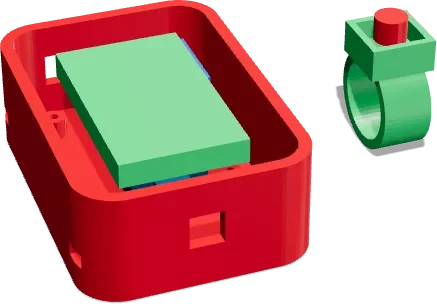
Kids OK, with an adult
DIY project. Children must build this only with an adult (16+ years) beside them at all times. Not suitable for children under 8 years.
In the glove code use Wire.begin(25, 26) for the I2C pins.
Strictly follow the description given with this video.
Video
The video link will be added here soon.
How it works
- The MPU6050 on the glove measures how your hand tilts and rolls.
- ESP32 #1 sends the angles over ESP-NOW, a direct radio link with no router.
- ESP32 #2 on the arm turns the angles into servo positions.
- The finger button closes and opens the gripper.
Parts you need
- 2× ESP32 dev boards× 2Buy
- MPU6050 (GY-521)× 1Buy
- Push button× 1Buy
- 4× SG90 / MG90S servos× 4Buy
- 5V 3A supply× 1Buy
- Small USB power bank (glove)× 1Buy
Kit for this projectPrice on request
Get the kitWiring
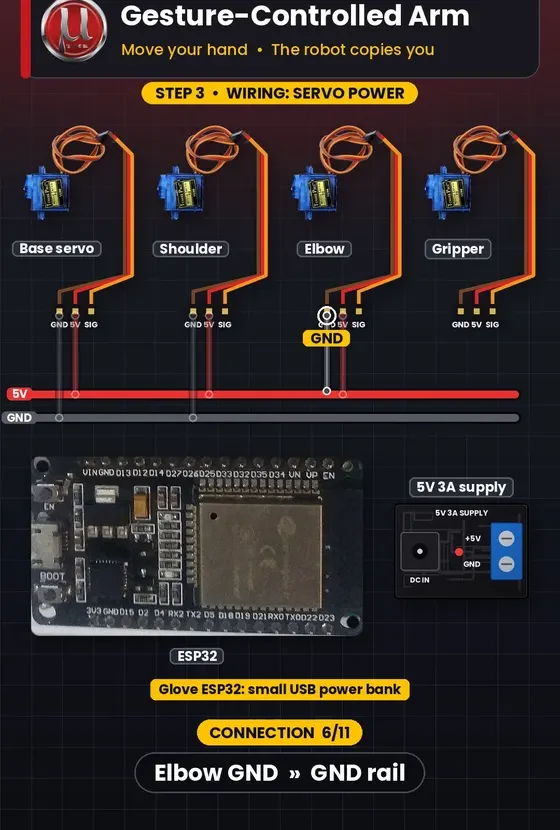
PowerGroundSignal
| # | From | Connect to |
|---|---|---|
| 1 Power | Glove: MPU VCC | ESP32 #1 VIN |
| 2 Ground | Glove: MPU GND | ESP32 #1 GND |
| 3 Signal | Glove: MPU SDA | ESP32 #1 D25 |
| 4 Signal | Glove: MPU SCL | ESP32 #1 D26 |
| 5 Signal | Glove: button SIG | ESP32 #1 D15 |
| 6 Ground | Glove: button GND | ESP32 #1 GND |
| 7 Signal | Arm: base servo | ESP32 #2 D14 |
| 8 Signal | Arm: shoulder servo | ESP32 #2 D27 |
| 9 Signal | Arm: elbow servo | ESP32 #2 D26 |
| 10 Signal | Arm: gripper servo | ESP32 #2 D25 |
| 11 Power | All servo 5V | 5V 3A supply + |
| 12 Ground | All servo GND | 5V 3A supply − |
| 13 Ground | ESP32 #2 GND | Supply − (common ground) |
3D print files
- glove_wrist_pod.stlPETG / TPU strap · 0.2 mmLink at launch
- finger_button_ring.stlPLA · 0.2 mmLink at launch
Code
The tested Arduino / ESP32 code for this project will be posted here, ready to copy.